# Corrupted fles & reinstall it.\\nlf
**URL:** https://forums.snapshotgames.com/t/corrupted-fles-reinstall-it-nlf/13286
**Category:** Bug Discussion
**Created:** [May 26, 2021, 2:45pm UTC](https://forums.snapshotgames.com/t/corrupted-fles-reinstall-it-nlf/13286 "2021-05-26T14:45:56Z")
**Posts on this page:** 11
**Page:** 1
### Author:  [@Toptigin](https://forums.snapshotgames.com/u/Toptigin)
#### Post date: [May 26, 2021, 2:45pm UTC](https://forums.snapshotgames.com/t/corrupted-fles-reinstall-it-nlf/13286/1 "2021-05-26T14:45:56Z")
Hello there,
So I’ve started playing the game with my save and after it loads to globe it is all fine BUT
when you open character menu it shows the msg below (it appers again and again). Also, I’ve noticed that characters have no armor/weapon display.

---
### Author:  [@mcarver2000](https://forums.snapshotgames.com/u/mcarver2000)
#### Post date: [May 26, 2021, 3:06pm UTC](https://forums.snapshotgames.com/t/corrupted-fles-reinstall-it-nlf/13286/2 "2021-05-26T15:06:57Z")
Have you verified your install?
---
### Author:  [@Toptigin](https://forums.snapshotgames.com/u/Toptigin)
#### Post date: [May 26, 2021, 3:09pm UTC](https://forums.snapshotgames.com/t/corrupted-fles-reinstall-it-nlf/13286/3 "2021-05-26T15:09:51Z")
how? where do I even get that file (it.\nlf)
---
### Author:  [@mcarver2000](https://forums.snapshotgames.com/u/mcarver2000)
#### Post date: [May 26, 2021, 3:12pm UTC](https://forums.snapshotgames.com/t/corrupted-fles-reinstall-it-nlf/13286/4 "2021-05-26T15:12:05Z")
Which launcher are you using? Check the game properties, there should be an option to verify.
---
### Author:  [@MadSkunky](https://forums.snapshotgames.com/u/MadSkunky)
#### Post date: [May 26, 2021, 3:17pm UTC](https://forums.snapshotgames.com/t/corrupted-fles-reinstall-it-nlf/13286/5 "2021-05-26T15:17:29Z")
The “it.\nIf” is probably only a typo, I guess it should be like:
> Some corrupted files were detected. Please exit the game and reinstall it.
> If problems persist, please contact Snapshot Games support.
The `\nIf` without a space between `n` and `If` seems to me a wrong typed control character for a new line (`\n`) in this message box. 🙂
---
### Author:  [@Toptigin](https://forums.snapshotgames.com/u/Toptigin)
#### Post date: [May 26, 2021, 3:24pm UTC](https://forums.snapshotgames.com/t/corrupted-fles-reinstall-it-nlf/13286/6 "2021-05-26T15:24:32Z")
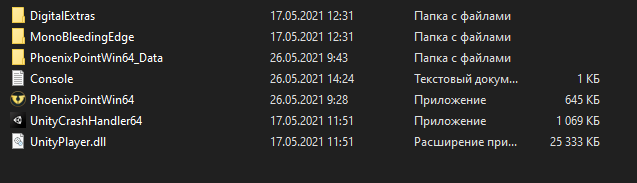
None. Only a shortcut that launches the game. Btw unitycrashhandler does not work at all. I mean there is no way I can check game files with the game itself or an app in its folder.
---
### Author:  [@Toptigin](https://forums.snapshotgames.com/u/Toptigin)
#### Post date: [May 26, 2021, 3:25pm UTC](https://forums.snapshotgames.com/t/corrupted-fles-reinstall-it-nlf/13286/7 "2021-05-26T15:25:35Z")
Yea, seems so. I think it is all about the new patch issues.
---
### Author:  [@MadSkunky](https://forums.snapshotgames.com/u/MadSkunky)
#### Post date: [May 26, 2021, 3:34pm UTC](https://forums.snapshotgames.com/t/corrupted-fles-reinstall-it-nlf/13286/8 "2021-05-26T15:34:09Z")
Where do got and patched the game?
I only know about Steam and Epic and how these works and there are also options to verify the game files in their launchers game libraries, but no Idea about MS game pass or GOG.
---
### Author:  [@Toptigin](https://forums.snapshotgames.com/u/Toptigin)
#### Post date: [May 26, 2021, 3:47pm UTC](https://forums.snapshotgames.com/t/corrupted-fles-reinstall-it-nlf/13286/9 "2021-05-26T15:47:41Z")
I think it patched itself. When I opened it there was a note in the game menu “Patch Notes”.
Anyway I’ve checked the files via Steam and it said that they did not pass the check. It is reinstalling them now.
Will keep updating what comes next lol
---
### Author:  [@Toptigin](https://forums.snapshotgames.com/u/Toptigin)
#### Post date: [May 26, 2021, 3:52pm UTC](https://forums.snapshotgames.com/t/corrupted-fles-reinstall-it-nlf/13286/10 "2021-05-26T15:52:55Z")
It seems to be working after file check via Steam (Library → PP → Properties → Check game files).
---
### Author:  [@sectoid\_br](https://forums.snapshotgames.com/u/sectoid_br)
#### Post date: [May 27, 2021, 6:21pm UTC](https://forums.snapshotgames.com/t/corrupted-fles-reinstall-it-nlf/13286/11 "2021-05-27T18:21:51Z")
I also got into this problem and solved it (it seems) the same way.